





Phishing simulation best practices decide whether your program actually makes you safer — or quietly chips away at the trust your team has in you. The nine rules below pull together what the research, NIST guidance, and GDPR rules say works in practice. They’re the difference between a program people learn from and one that ends up on HR’s desk.
Key Takeaways
- An employee who feels tricked after a simulation is a security gap they stop reporting real threats, not just simulated ones
- Program-level transparency does not compromise a simulation’s validity; it is what makes it a learning tool rather than a surveillance exercise
- The click rate is a limited metric in mature programs; the reporting rate tells you more about actual security posture
- Annual phishing training has negligible measurable impact on behavior; the evidence supports monthly simulations with group-level follow-up
- If your last simulation triggered complaints or a union grievance, a structured repair path exists and it starts with acknowledgement, not another test
Phishing simulation best practices are not a checklist of technical settings. They are the design, delivery, and ethical principles that determine whether a program builds employee trust or destroys it and whether it actually improves security.
That distinction matters because most guides treat trust as a secondary concern, something to manage after the click rate is under control. The research says otherwise. An employee who feels ambushed by a simulation is less likely to report a real attack. The emotional outcome is not a soft HR variable. It is a security outcome.
You ran a phishing simulation. An employee clicked. They found out it was a test. Now HR has a complaint on file, the union representative wants a meeting, and two people have quietly stopped reporting suspicious emails because they’re afraid of looking foolish again. You didn’t intend for this to happen. Here are the nine rules that would have prevented it and that can still fix it.
Rule 1: Why does employee trust determine whether phishing simulations actually work?
The standard logic runs simulate phishing, lower the click rate, improve security. That logic is incomplete.
An employee who clicks on a simulated phishing email, discovers it was a test, and feels humiliated will respond in one of two ways. They will ignore suspicious emails to avoid further scrutiny. Or they will stop reporting anything at all, because reporting invites attention they don’t want.
Both outcomes make the organisation less secure.
According to a 2024 annual phishing industry report, only 18.3% of simulated phishing emails are reported correctly by employees. That figure not the click rate is your most important baseline. It measures how many employees are actively engaged in detecting threats versus quietly opting out of the process.
The employee who feels tricked is not a soft HR concern. They are a gap in your early warning layer.
Rule 2: What should you communicate to employees before running a phishing simulation?
More than most programs currently communicate and less than you think would compromise the test.
Program-level transparency does not undermine a simulation. It is what separates a learning exercise from a surveillance exercise in the minds of employees and, increasingly, in the view of works councils and regulators.
In practice, this means:
- An all-staff communication confirming that phishing simulations are part of the security program, without specifying dates or scenarios
- A clear statement that the goal is skill-building, not catching people out
- A commitment that results will be reported at team or department level, not individually
- Involvement of HR and, where relevant, employee representatives, before the program launches
The UK’s National Cyber Security Centre (NCSC) specifically warns that poorly framed simulations create an adversarial dynamic employee who feel monitored by the security team, rather than supported by it. That dynamic is avoidable. It is a design choice.
The pre-launch notice that protects trust without compromising the test
A well drafted all staff notice does not say: “A phishing simulation is coming on Tuesday.” It says, in plain language, that simulated phishing is one of several awareness tools the organization uses, that the goal is to help employees learn, and that results are reported at team level.
That framing is honest. It also produces better data employees who understand why a program exists engage with it differently.
Rule 3: Which phishing simulation scenarios reliably trigger grievances?
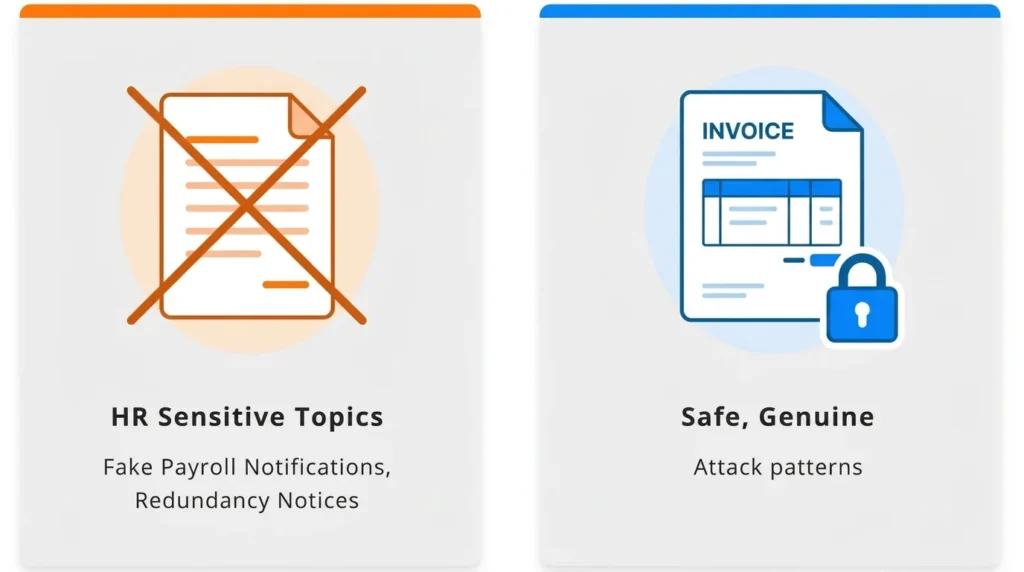
At a 2025 security research symposium, researchers placed HR-sensitive topics in their own category of ethical violation in simulation design. The reason is straightforward. Scenarios that reliably produce grievances are the ones that exploit emotions an employee cannot separate from their job security or personal life. That rules out a familiar set of templates: fake redundancy or disciplinary notices, simulated health emergencies or safety alerts, fake bonus announcements that turn out to be traps, and any message disguised as a benefits change, payroll error, or pension update. Each of these sits too close to something the employee is already worried about in real life.
A practical ethics framework for scenario selection
Before approving any scenario, ask two questions:
- If an employee clicks and then discovers it was a test will they feel taught, or will they feel targeted?
- Could this scenario cause genuine distress to someone currently dealing with a real version of this situation?
If the answer to either is yes, choose a different scenario.
Scenarios that work well: fake invoice approval requests, shared document notifications, password expiry alerts, courier delivery notices, and IT helpdesk impersonations. These reflect genuine attack patterns. They do not weaponize anxiety.
The highest-click-rate scenario is not automatically the best training scenario. It may also be the fastest route to a formal grievance.
Rule 4: How do you prevent employees warning each other during a simulation?
When a simulated phishing email reaches your entire organization simultaneously, someone clicks, recognizes it as a test, and tells the person next to them. Within minutes, the simulation is compromised. Your data reflects awareness of the simulation not awareness of phishing.
This is not a hypothetical risk. It is documented and consistent.
The solution:
- Use staggered delivery over several days or weeks, not a single simultaneous send
- Randomize scenario variants across cohorts where possible
- Avoid sending to entire departments at the same time
Staggered delivery does not guarantee unprimed responses from every participant. It substantially increases the proportion that reflects genuine, habitual behavior which is the data worth having.
Rule 5: How often should you run phishing simulations?
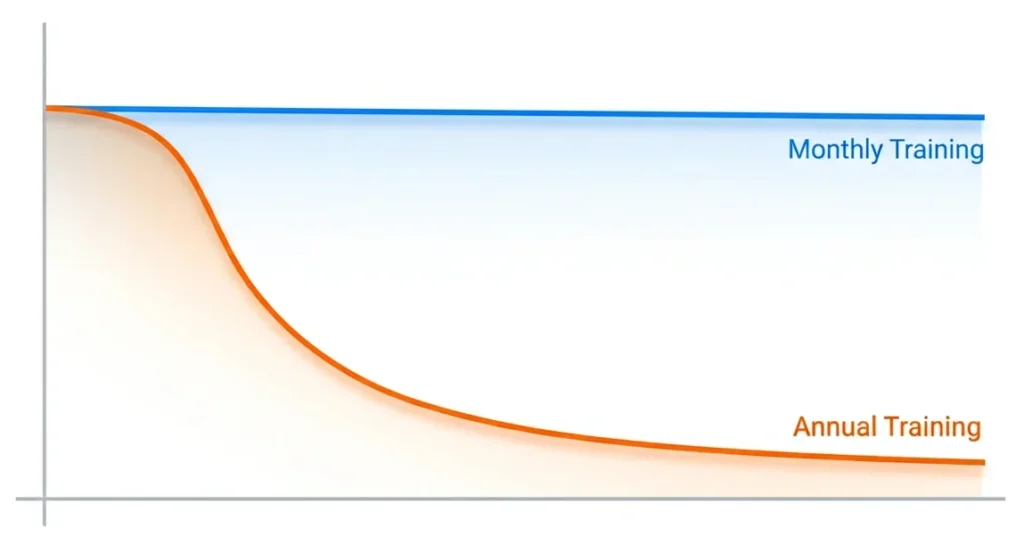
Most organizations run simulations quarterly. The research does not support this cadence.
A peer-reviewed scoping review of 42 phishing simulation studies concluded that annual programs are unlikely to provide sustained protection. Training effects decay the benefit of any single event fades within weeks, not months.
According to a 2025 annual data breach investigation report, employees trained in the last 30 days are four times more likely to report suspicious email than those trained earlier in the year. Recency matters more than total training hours.
A 2025 longitudinal study across 20 organizations found that sustained simulation programs halved successful compromise rates within six months. The same study found that employee turnover introduced measurable fluctuations in awareness levels, underscoring the need for continuous onboarding into the training cycle.
Monthly is what the evidence supports. Quarterly is what most organizations do. The gap between these two positions is where much of the residual risk lives.
Rule 6: What should you measure instead of the click rate?
The click rate is useful at program launch. In a mature program, it is a limited metric.
According to a 2025 industry benchmarking report analyzing 67.7 million simulations across 62,400 organizations:
- The global average click rate before any training is 33.1%
- After 12 months of consistent, simulation-based training, that figure falls to 4.1% an 86% reduction
- A 40% reduction typically occurs within the first 90 days
Separately, a 2025 annual data breach investigation report found that in well-managed, mature programs, the median simulation click rate stabilizes near 1.5%. Once a program reaches that level, click-rate tracking stops providing useful new information.
The reporting rate is the metric that matters at this stage. It measures the proportion of employees who identify a simulated phishing email and reports it correctly through the designated channel. A 2024 annual phishing industry report found that only 18.3% of simulated emails are reported on average. In financial services, that figure rises to 32.35% reflecting what sustained, sector-specific training actually produces over time.
When presenting results to leadership, pair the reporting rate with a difficulty rating for the scenarios used. NIST’s Phish Scale provides a framework for scoring email difficulty making your headline results genuinely comparable over time, rather than artefacts of which scenario you chose to send.
Rule 7: Does phishing simulation training actually work? What the research really shows
The honest answer is: it depends on the design. The version that most organisations run is not the version that the evidence supports.
A 2025 study by US university researchers, analysing 12,511 participants at a US-based financial technology firm, found that annual one-off training had negligible measurable impact on simulated phishing failure rates. Optional post-click training pop-ups the immediate landing page that appears when an employee click performed barely better. Most employees closed the page within a short time of loading it.
A multi-year European university study tracking over 14,000 employees found something more counterintuitive: embedded post-click training sometimes increased susceptibility in subsequent simulations. The proposed mechanism is overconfidence employees who completed an immediate training module felt more protected than they were, and became less cautious as a result
These findings do not mean simulations are ineffective. They mean the standard implementation model annual e-learning plus an immediate pop-up is not the version that works.
What the research does support:
- Monthly or near-monthly simulation frequency
- Organisation-wide educational follow-up delivered after the simulation, rather than immediately at the point of click
- Integration with broader security culture not treatment as a standalone annual compliance event
The NCSC notes a complementary format worth considering asking employees to craft their own phishing emails as a learning exercise. This builds genuine understanding of social engineering without the adversarial dynamic that simulations can create. It is not a replacement but for teams that have experienced significant pushback, it is a useful addition.
Rule 8: What are your legal obligations when running phishing simulations?
If your organization operates in the European Union, phishing simulations now carry a regulatory dimension that did not exist two years ago.
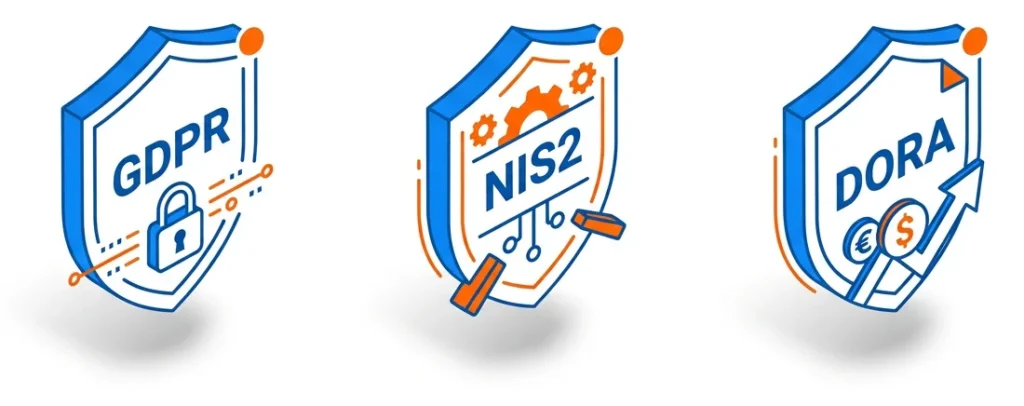
The NIS2 Directive mandatory for EU essential and important entities since October 2024 requires organizations to demonstrate the effectiveness of security training, not merely record that training occurred. Auditors now require evidence of measurable outcomes. A complete training checkbox is no longer sufficient.
For financial sector organizations, DORA imposes comparable obligations with sector-specific requirements.
Individual tracking and GDPR
Every click a simulated phishing email records is personal data under the General Data Protection Regulation.
The legal basis most commonly cited employee consent is not valid in this context. Under GDPR Article 6, consent in an employment relationship is not freely given because of the inherent power imbalance. Legitimate interest is the correct legal basis, but it must be documented in a Legitimate Interest Assessment before the program begins not retrospectively.
Under Article 5(1)(c), reporting simulation results at individual level may breach the data minimisation principle. NIST SP 800-50 Rev. 1, published in September 2024, recommends reporting at group or department level not naming individual employees to prevent the development of a punitive culture.
⚠️ This section presents general guidance, not legal advice. Specific obligations depend on your jurisdiction, sector, and existing data processing agreements. Verify with qualified legal counsel before launching any program that involves individual-level data collection.
Rule 9: What phishing simulation best practices apply after program backfires?
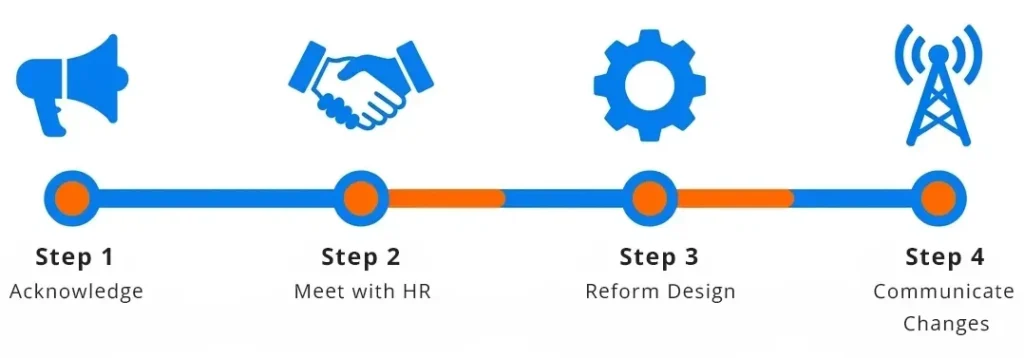
If your last simulation triggered formal complaints, a union grievance, or a visible drop in voluntary reporting, the following sequence applies.
A post-incident repair protocol
Step 1: Acknowledge within 48 hours. Send an all-staff message. Do not frame it as a justification. Acknowledge that the simulation caused distress, explain the intent, and state what you are changing. Silence causes more lasting damage than candid acknowledgement.
Step 2: Meet with HR and employee representatives before doing anything else. Do not run another simulation until this meeting has taken place. In unionized environments, this step determines whether the next program is seen as collaboration or provocation.
Language that tends to work in these conversations:
- “Our goal is to reduce risks to this organization and to the people in it. We want to design a program that works with employee trust, not against it.”
- “We are open to co-designing the scenario categories with employee representatives.”
- “Individual results will not be shared with line managers or used in any performance or disciplinary process.”
Step 3: Reform the program design before restarting. Apply the scenario ethics framework from Rule 3. Confirm the pre-launch communication plan. Document the legal basis for data collection as described in Rule 8.
Step 4: Communicate the changes to all staff. Before the next simulation goes out, tell employees what changed and why. This is the single action most likely to rebuild trust. It demonstrates that the feedback was heard and that the program exists to help them not to catch them.
Platforms like Complorer are designed specifically for this transition supporting security managers who need to restart a phishing simulation program with the conditions for trust already in place, rather than simply resuming a broken one.
Where do you go from here?
The nine rules above share a single underlying logic an employee who understands why a simulation exists and trusts that it will not be used against them will learn from it. An employee who feels ambushed will not.
The research is clear on what works frequent, ethically designed simulations, paired with transparent communication and results reported at group level. Annual training does not work. Pop-up training that employees close within seconds does not work. Scenarios that simulate redundancy notices or health emergencies destroy trust faster than they build skill.
If your last simulation created a problem, do not run a better simulation next month. Rebuild the conditions under which simulation can function as a learning tool. Start with Step 1 of the post-incident repair protocol. Everything else follows from there.
To explore how Complorer supports organizations building phishing simulation programs that employees trust and that produce measurable security improvement visit the Complorer platform.
Frequently Asked Questions
What is the most common mistake in phishing simulation programs?
Prioritizing the click rate above all other measures. A low click rate tells you that employees can recognize your current scenarios it does not tell you whether they would report a real attack, or whether they trust the security team enough to stay engaged. The reporting rate is a better indicator of program health, and most organizations do not track it consistently.
How do I handle an employee who repeatedly fails every phishing simulation?
Persistent high-risk individuals need a different approach not more of the same test. Consider one-to-one support from the security awareness team, role-specific training focused on the attack types most relevant to their job function, and a review of whether that function creates unusual exposure. Never use simulation data as the basis for disciplinary action. This increases fear, reduces reporting, and may create legal exposure under data protection law.
Is it legal to run phishing simulations under GDPR?
Yes, but the legal basis and data handling must be correctly documented before the program begins. Employee consent is not a valid legal basis in the employer-employee context. Legitimate interest is the standard basis, documented through a Legitimate Interest Assessment. Results should be reported at group or department level, not at the individual employee level. Verify your specific obligations with qualified legal counsel, particularly if NIS2 or DORA applies to your organization.
How do I get union or employee representative buy-in for phishing simulations?
Involve them before the program is finalized not after the first complaint. Share the design early, frame simulations as a tool to protect employees rather than test them and agree on acceptable scenario categories in advance. Commit in writing that individual click data will not be shared with line managers or used in performance or disciplinary processes. Co-designed programs consistently see lower resistance and higher genuine engagement.
Does phishing simulation training actually work?
The evidence is more nuanced than most content on this topic acknowledges. Annual training has negligible measurable impact, according to a 2025 study of 12,511 participants at a US-based financial technology firm. Immediate post-click training pop-ups are rarely effective most employees close them within a short time of loading. However, monthly simulations combined with organization-wide follow-up education produce meaningful results. A 2025 longitudinal study across 20 organizations found that sustained programs halved successful compromise rates within six months. Frequency and design matter significantly more than the length of any single training event.
References
[1] UK National Cyber Security Centre. (2024). Phishing Attacks: Defending Your Organization. Government guidance. https://www.ncsc.gov.uk/guidance/phishing
[2] National Institute of Standards and Technology. (2024, September). Building an Information Technology Security Awareness and Training Program. NIST Special Publication 800-50 Rev. 1. https://csrc.nist.gov/pubs/sp/800/50/r1/final
[3] National Institute of Standards and Technology. (2024). NIST Phish Scale User Guide. https://www.nist.gov/publications/nist-phish-scale-user-guide
[4] Verizon. (2025). Data Breach Investigations Report 2025. Annual industry report. https://www.verizon.com/business/resources/reports/dbir/
[5] Anonymous et al. (2025). Sustaining Cyber Awareness: The Long-Term Impact of Continuous Phishing Training and Emotional Triggers. arXiv preprint arXiv:2510.27298. https://arxiv.org/html/2510.27298v1
[6] Lain, D., Jost, T., Matetic, S., Kostiainen, K., & Capkun, S. (2024). Content, Nudges and Incentives: A Study on the Effectiveness and Perception of Embedded Phishing Training. Proceedings of the 2024 ACM SIGSAC Conference on Computer and Communications Security (CCS ’24). arXiv preprint arXiv:2409.01378. https://arxiv.org/abs/2409.01378
[7] Phishing by Industry Benchmarking Report. (2025). Industry benchmarking report. Analysis of 67.7 million simulations across 62,400+ organizations. https://www.knowbe4.com/resources/reports/phishing-by-industry-benchmarking-report
[8] UK Information Commissioner’s Office. (2024). Monitoring workers: Employment practices and data protection. https://ico.org.uk/for-organisations/uk-gdpr-guidance-and-resources/employment/monitoring-workers/
[9] State of the Phish. (2024). Annual phishing simulation benchmarking report. https://www.proofpoint.com/us/resources/threat-reports/state-of-phish
[10] Rozema, A., et al. (2025). Anti-Phishing Training (Still) Does Not Work: A Large-Scale Reproduction of Phishing Training Inefficacy Grounded in the NIST Phish Scale. arXiv preprint arXiv:2506.19899. https://arxiv.org/abs/2506.19899
[11] Lain, D., Kostiainen, K., & Capkun, S. (2022). Phishing in Organizations: Findings from a Large-Scale and Long-Term Study. IEEE Symposium on Security and Privacy. arXiv:2112.07498. https://arxiv.org/abs/2112.07498
[12] Ho, G., Mirian, A., Luo, E., Tong, K., Lee, E., Liu, L., Longhurst, C. A., Dameff, C., Savage, S., & Voelker, G. M. (2025). Understanding the Efficacy of Phishing Training in Practice. IEEE Symposium on Security and Privacy. DOI: 10.1109/SP61157.2025.00076. [13] Proofpoint. (2025). Phishing Tests Reveal Human-Targeted Threats Are Evolving. https://www.proofpoint.com/us/blog/email-and-cloud-threats/phish-tests-reveal-human-targeted-threats-evolving



 Buy on AWS Marketplace